When analyzing your browser fingerprint on sites like BrowserLeaks, you might encounter a highly specific classification under the TCP/IP Fingerprint section called "Link Type". Seeing a label like OpenVPN UDP bs64 SHA1 lzo or Probably IPsec or other VPN can be alarming. It immediately triggers concerns about whether your proxy is leaking, or if your identity is actively exposed to anti-fraud systems.
However, in modern, real-world internet networking, this data is very often a complete false positive. This article breaks down why "Link Type" detection is mostly an outdated myth, how TCP/IP fingerprinting works, and why cellular and mobile network configurations trigger these false alarms.
How TCP/IP Fingerprinting Actually Works
To understand why this classification is often incorrect, we must understand how it is derived. Tools like BrowserLeaks do not actively inspect or intercept your decrypted traffic. Instead, they use passive TCP/IP fingerprinting tools (most notably p0f) to look at the network packets sent during the initial TCP handshake.
Specifically, p0f analyzes parameters like:
- Maximum Segment Size (MSS): The largest amount of data (in bytes) that a device can receive in a single TCP segment.
- Maximum Transmission Unit (MTU): The largest physical packet size (in bytes) that can be transmitted over the network. MTU is calculated directly from MSS (usually
MTU = MSS + 40 bytesof TCP/IP header overhead). - TTL (Time to Live) and Window Size: Default system settings that indicate the host operating system.
The Root of the Myth: Outdated databases
Fingerprinting tools compare your connection's MTU/MSS against static signature databases. These databases are essentially snapshots of old, historical networks:
- The Historic Setup: Years ago, a specific OpenVPN configuration with LZO compression on a standard network was one of the few configurations that consistently produced an MSS of exactly 1368 bytes (which maps to an MTU of 1408).
- The Static Mapping: The p0f database hardcoded this relationship. If a packet arrived with an MSS of 1368, the database blindly declared: "This is an OpenVPN UDP connection."
The Modern Network Reality: Dynamic MTUs
Today's internet is highly dynamic and mobile-driven. Internet Service Providers (ISPs), especially 4G, 5G, and fiber network operators, use a wide variety of encapsulation, tunneling, and overhead-management technologies to optimize their infrastructure. They routinely set custom, seemingly arbitrary MTU sizes to prevent packet fragmentation over cellular bands.
If your mobile operator or ISP sets their network configuration to an MTU size that yields an MSS of 1368, p0f will confidently label your connection as an OpenVPN connection—even if you are using a completely clean cellular connection with absolutely no VPN or proxy involved.
Real-World Examples of Outdated Guesses
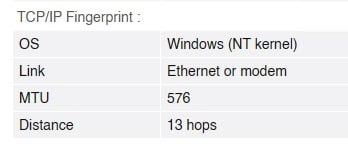
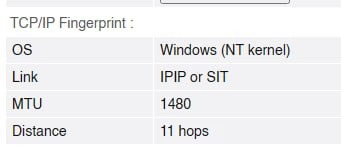
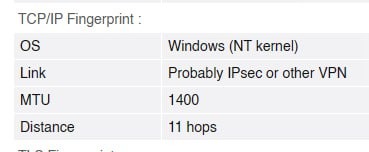
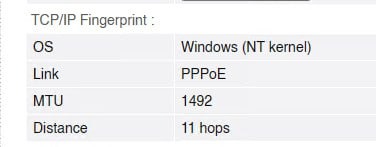
Let's look at some real examples of BrowserLeaks TCP/IP fingerprints showing how simple, standard network configurations are mapped to highly specific link types:
The Takeaway
The "Link Type" in TCP/IP fingerprinting is not a definitive analysis of your traffic; it is merely an educated guess based on outdated MTU averages from a bygone era. An unusual or highly specific link type is almost always just your ISP managing their network routing, not a leak in your disguise.
When you use high-quality SOCKS5 mobile proxies with UDP support (like those from ProxyUDP), your network packets are fully encapsulated and routed through genuine mobile network hardware. If a scanner detects a strange MTU signature, it is simply seeing the normal, authentic footprint of the mobile operator's cell tower infrastructure—which actually makes your connection look more like a real, organic mobile user!
Looking for Bulletproof Mobile Proxies?
Don't let outdated fingerprint databases fool you. Get real mobile connection trust scores with ProxyUDP's elite SOCKS5 proxies featuring native UDP support and cellular IP rotation.